[202] How & Why to Document your Business Systems

How often do you find yourself doing a repetitive task in your business, and thinking… ‘what’s the next step again?’

Do you find you leave out/forget important steps in the process?

Do you get the same questions from customers over and over again, and have to write out the same answer multiple times?

Do you make mistakes (hello, sending the wrong order to the wrong person *cringe*) and have to deal with the unpleasant consequences (P.S. I have TOTALLY done this – do not recommend).

A LOT of the work we do in business is repetitive. And we can speed things up, reduce errors, cut down the mental load, AND make it easier to teach others how to help us if we properly document our business systems.

In this premium episode I’m going to:


  • give examples of some of the (many!) systems in your biz that you can document (some of which you’ve probably never considered);
  • outline the numerous reasons why you should take a little time to document these systems as you go; and,
  • give you a whoooole bunch of ways you can document these systems.
[sdm_download id="6073" fancy="0"]

Highlights:

Examples of systems

  • How do I make this particular design?
  • What is my order processing process?
  • How do I communicate important details to my customers?
  • What is the process of listing a new item in my online store?
  • What is my packaging process?
  • What is my weekly marketing process?
  • What are the steps to posting on IG?


Why

  • To help you streamline & make improvements
  • To help you determine how long/how many steps a task takes
  • So you don’t miss any important steps
  • If you ever hire someone, you can give them the documentation to train them


How

  • Trello – make a board/list for each process
  • Loom – record you and your screen
  • Etsy & email – canned responses to speed up customer communication
  • Could also store these in your phone notes for use on IG and FB
  • Create a spreadsheet/document – consider using google docs or something else in the cloud – you can access it from anywhere and share it with others if necessary.

[198] Setting Boundaries in your Handmade Biz

Do you struggle to set boundaries in your handmade biz?

Maybe you feel like you have to respond to every email or message RIGHT NOW.

Perhaps you feel like you should ALWAYS be working.

Maybe you struggle to focus when there are chores catching your eye around the house.

Or do you find it hard to say ‘no’ to family and friends when they want your attention during what should be work time?

 In this episode, I go into detail about all the different sorts of boundaries you need to set in your handmade business – around your time, your privacy, and much more.

I share a few challenges I’ve faced over the years to set boundaries (and why I took Facebook off my phone…), and share many tips about why boundaries matter, and how you can set and enforce them. 

[sdm_download id="6011" fancy="0"]

[194] 6 Tactics to Organise your To-Do List

Is your to-do list a hot mess?

Do you find yourself wasting time because you don’t know what to focus on next?

Do you over or underestimate the time tasks will take, and continually push things off your list to ‘get to later’?

Do you feel like you’re on an endless treadmill – never moving forward, but sometimes even falling off the end?

I know how that feels – and over the last 10 years, I’ve designed a planning system and organised to-do list that keeps me on task and – more importantly – sane.

In this episode I outline my own day-to-day planning system, and share 6 tactics you can use to organise your epic to-do list into something that will help you move forward and feel accomplished at the end of the day/week.

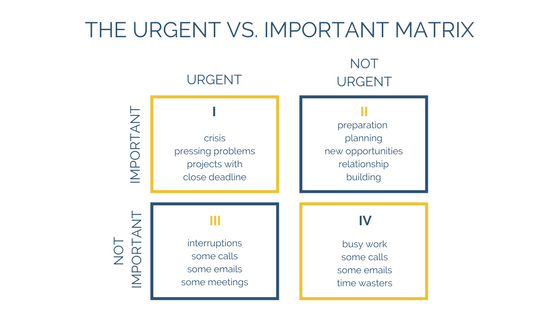
P.S. Below are a few of the matrices that I refer to in the episode!

[sdm_download id="5901" fancy="0"]

[190] Steps to Pinterest Success

Are you ready to harness the Power of Pinterest?

The #PinterestChallenge is happening again in June (more info below if you’re new to this) so I have recorded a podcast episode to help you get set up for success!

If you are new to Pinterest, this episode will help you set up all the important elements of your account. If you’re not new, it will be a great refresher!

If you’ve got an account and don’t really know what to do next – I’ve got you! Listen in to this episode now.


[sdm_download id="5780" fancy="0"]
  • Go listen to episode 144 The Power of Pinterest first, if you haven’t heard it, where I try to convince you why pinterest matters. Pinterest is the biggest referrer to C&T after google, and on Etsy, it’s third after direct traffic and etsy search. It works.
  • Steps to set yourself up for Pinterest Success.
  • Avatar – you or a product or a logo.
  • Name – include your biz name – it will show up on any pins from your website.
  • Bio – your elevator pitch. Use keywords!
  • Claim your website and/or etsy shop and instagram (youtube if you have it).
  • Pin all your products to a you.com board. Spread this out over time (tailwind, buffer etc).  
  • Repin your work to niche boards (silver rings, silver earrings, eco wedding, men’s wedding style, etc) mixed with other complementary products.
  • Use Tailwind or another service to buffer pins. Or set a time in your schedule to do so manually.
  • Use group boards or tailwind tribes to spread the reach of your pins.
  • Make pinning a habit (pinterest challenge – 10 minutes a day!).
  • Keep an eye on your analytics.

What is the #PinterestChallenge?


  1. Start by writing down your current Pinterest stats (boards, pins, likes, followers, following, monthly views) as of today.
  2. Make sure you have a BUSINESS account with stats enabled. And, if you can set up Rich Pins/Verification.
  3. Commit to spending 10 minutes per day Pinteresting… 😀 (i.e pinning, re-pinning, liking, etc.). Ideally, set a reminder on your phone and stick to it.

  4. At the end of the month, come back and write down your stats again – and share your results with the Circle!
  5. Leave a comment under the Project post in the FB group if you’re committing to the challenge!
  6. BONUS – join our group board and also the public Create & Thrive Community board and be active on those. I have almost 12k followers, so that’s a great way to get a bit of traction, especially if you’re new to Pinterest.

The Challenge officially starts on June 1st, but why not use the next week to take the success steps above and get yourself ready to roll? 😀

[186] 9 Strategies to Overcome Analysis Paralysis

What the heck do I do next?

How often do you ask yourself this question?

How often do you feel stuck and overwhelmed, and like you can’t move forward?

Often, we get stuck because we’re in analysis paralysis – there are no good options, or too many good options – and we just don’t know which way to go, or what to choose.

In this episode I share 9 strategies you can use to make the right decision – no matter how big or small – so you can move forward in your biz.


[sdm_download id="5705" fancy="0"]
  • Get all the ideas out of our head and written down (paper, trello etc) mention GTD (David Allen) method.

  • Organise these ideas in some way (use my own trello boards as an example).

  • Analyse. It might help to look at numbers, stats, patterns so you’re fully armed with practical knowledge.

  • Go back to your why, your core values, and your ultimate goal. Which choice lines up best with these things?

  • Engage a brains trust or sounding board (partner, colleagues, Circle etc). Try to give them options – but use this as a guide – take note of how their answers feel (use the trick of someone choosing something for you – if you feel good, it’s right, if you feel bad, it’s the other option).

  • Take a break – sometimes our brains just need some space. Do something completely different that engages the body – like a walk, swim, massage, etc. – you’ll probably find some inspiration bubbles up from this.

  • Stop consuming content for a few days – podcasts, blogs, insta, social… and just sit with the choice quietly, without the noise.

  • Reach out to your customers. Let them guide you – after all, they’re the ones who are going to purchase! But beware that sometimes they don’t 100% know what they want – you have to interpret things for them sometimes.

  • Be aware of negative drivers – are you making a decision based on irrational fear or other negative emotions?

  • Trust your gut.

[182] The Stats to Track for your Handmade Business {Inc. Downloadable Spreadsheet}

As per popular demand – this episode is all about stats – the stats you should track, why you should track them – and I’ve got a downloadable spreadsheet you can use right now to get started!

We’re also going to use this in April 2019 as the basis of our monthly project, so get listening and start thinking about what stats you want to track in your biz – and why.

Enjoy! 

[sdm_download id="5656" fancy="0"]

Download your tracking spreadsheet here!

(ODS format – for Open Office – can also be opened in Excel.)

  • Decide what your goal is.
  • Growing subscribers/numbers isn’t an effective end-goal – more a marker on the path.
  • The ultimate goal should be sales/money.
  • These methods of growing traffic/sales are like the tributaries that lead into a river of revenue – pouring more ‘water’/followers into them isn’t effective unless there is a flow-through effect.
  • Where are you going to be focussing your growth effort?
  • Mailing list, pinterest, social, traffic.
  • Why have you chosen what you’ve chosen?
  • Pinterest: Make sure you’ve claimed your site and go into the analytics. You’re looking for upward trends – and especially in views of pins from your website (You can only do the full website claim with a url you own – you can claim your etsy site, but it’s not the same – it adds your name and profile picture to pins from your shop, which is handy!)
  • Mailing list: Subscribes per day/week. Unsubs in same period. Open and click rate of mailouts.
  • Instagram: Follows. Traffic (use a landing page on your site). Engagement (likes and comments on posts over time).
  • FB: Follows (not just likes). Look in stats. Use this (and IG) data to get a clearer idea of your customers.
  • Twitter: Follows, traffic from links, known sales.
  • Blog/website/shop views: look for traffic trends and sources. Look for top posts/pages. What is bringing people in to those. Could you do more? If Etsy, look into stats at keywords – especially long-tail.
  • Markets: Sales/revenue. You could even use a clicker to measure how many people stop on a given day and compare this to sales.Consignment/Wholesale: How is your work selling over time? In what stores? What items are selling more than others?